How to Find Your Nintendo Switch Serial Number
A quick guide to locating your Switch's serial number for patch status checking.
Quick Answer
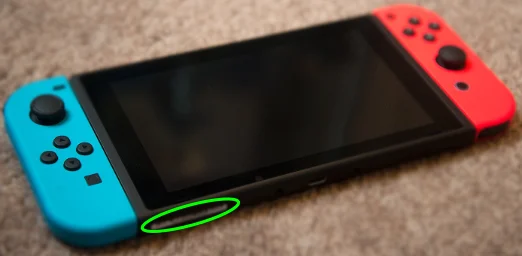
The serial number is located on the bottom of your Switch, near the USB-C charging port. It starts with "XA" followed by letters and numbers.
If Your Console is Still Boxed
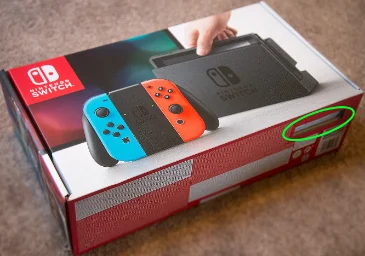
If your Nintendo Switch is still in its original packaging, you can find the serial number in two places without opening the box:
- Through the cutout hole - Look through the small window in the cardboard packaging
- On the box sticker - Check the barcode sticker on the outside of the box

If Your Console is Already Unboxed
For an unboxed Nintendo Switch, the serial number is printed on a sticker on the bottom of the console:
- Turn your Switch over so you're looking at the back
- Look at the bottom edge, near the USB-C charging port
- Find the white sticker with the serial number
- The serial starts with "XA" (e.g., XAW10012345678)

Understanding the Serial Number Format
Nintendo Switch serial numbers follow a specific format:
- First 4 characters (Prefix) - Letters indicating model and region (e.g., XAW1, XAJ7)
- Next 6+ digits - The unique identifier for your console
Prefix + Serial Number
When using our checker, you'll select the prefix (first 4 characters) from a dropdown, then enter the next 6 digits manually.
Switch Lite & OLED Models
The serial number location is the same for all Nintendo Switch models:
- Nintendo Switch (Original) - Bottom of console, near USB-C port
- Nintendo Switch Lite - Bottom of console, near USB-C port
- Nintendo Switch OLED - Bottom of console, near USB-C port
Important Note
Nintendo Switch Lite and Nintendo Switch OLED models are all patched and cannot run custom firmware via the RCM exploit. Only original Nintendo Switch consoles manufactured before mid-2018 may be unpatched.
What's Next?
Now that you've found your serial number, you're ready to check if your Switch is patched!